- What Should Drive the Decision?
- 5 Directions to Consider When Moving Beyond HubSpot
- 1. Another traditional CRM
- 2. A more customizable CRM
- 3. An end-to-end business platform
- 4. Industry-specific software
- 5. A solution built around the business
- HubSpot Alternatives Compared: Focus on Business Value
- Switching CRMs: Don’t Treat Migration as a Data Export
- Don’t Just Replace HubSpot — Rethink What You Need
- PLANNING A HUBSPOT MIGRATION?

Switching business software is rarely about finding a longer feature list. For growing SMBs, the decision increasingly comes down to whether their technology still delivers enough value for its cost—and whether it can support what the business needs next.
Recent research reflects those priorities. In Kinetic Business's 2025 SMB technology survey, 48% of respondents cited cost and ROI as a major factor in technology purchases, while 39% cited implementation time and 34% cited integration with existing technology. Canadian software buyers are asking similar questions.
For example, Capterra found that only 40% of surveyed Canadian buyers were fully satisfied with a recent software purchase. Integration issues, data migration problems and budget overruns were among the most common causes of implementation disruption.
Those considerations matter when evaluating a HubSpot alternative. HubSpot now offers a broad customer platform spanning marketing, sales, service, content and data management, with options ranging from free tools to more comprehensive Professional and Enterprise packages.
But as a company grows, its requirements may become more complex—and the economics, integrations, automation needs and processes surrounding its software can evolve with it.
That is why exploring HubSpot alternatives doesn't have to begin with the question, Which CRM has more features? A better starting point is: What does our business need its technology to accomplish now—and what will we need it to accomplish next?
What Should Drive the Decision?
Before comparing products, define what the business actually needs from its technology. The right alternative to HubSpot should solve the company's current problems while providing enough flexibility to support where it is headed.
Cost matters, but the subscription price is only one part of the equation. Businesses should consider total cost of ownership, including implementation, migration, integrations, training, administration, and the cost of maintaining multiple applications when a single connected environment could replace them.
Integration is another important consideration. A CRM rarely operates alone. It may need to exchange information with accounting software, marketing tools, customer service platforms, document systems, e-commerce applications, or industry-specific software. The more disconnected those systems are, the more manual work and duplicate data they can create.
Automation and scalability matter as well. Businesses evaluating HubSpot alternatives for small business should consider whether the technology can adapt as processes become more sophisticated, transaction volumes increase, and new operational requirements emerge.
Ultimately, the decision shouldn't begin with which product has the most features. It should begin with the question: “What are we trying to accomplish?” Once that is clear, the range of possible solutions becomes much broader than another CRM.
5 Directions to Consider When Moving Beyond HubSpot
Once a business decides its current setup no longer fits, the obvious next step is to compare other CRMs. But that can unnecessarily narrow the decision. The best alternative to HubSpot may be another CRM, or it may require a broader view of the company's technology environment.
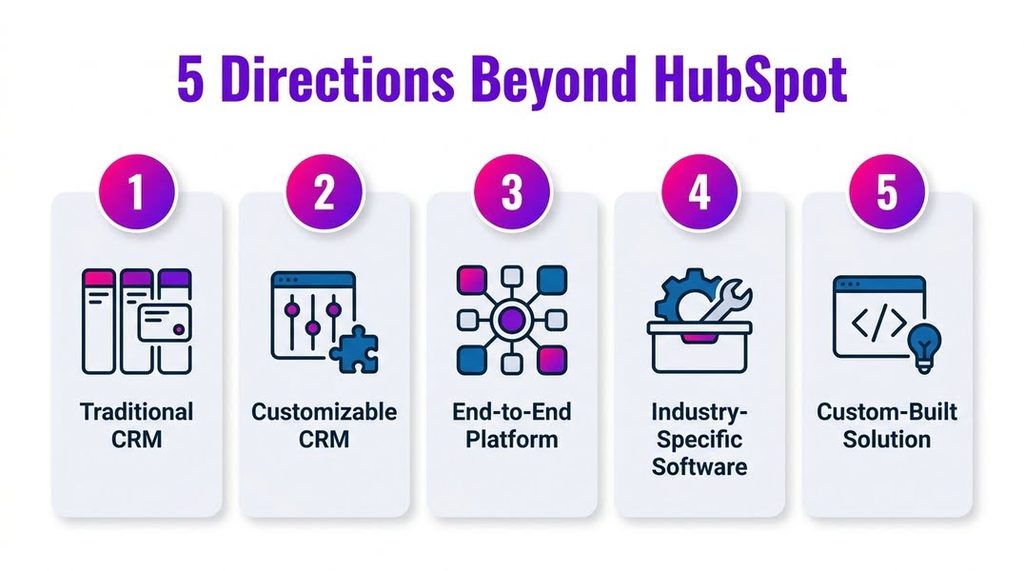
1. Another traditional CRM
For businesses that primarily need to manage leads, deals, pipelines, and customer relationships, another established CRM may be sufficient. Platforms such as Pipedrive and Freshsales offer different approaches to these core functions without requiring a company to rethink its entire technology stack.
This path makes sense when the CRM itself remains the central requirement and the surrounding business processes are relatively straightforward.
2. A more customizable CRM
Growing businesses often reach a point where they need their CRM to adapt to their processes rather than the other way around.
This is where Zoho vs HubSpot becomes a more meaningful comparison. Zoho CRM supports extensive customization, workflow automation, integrations, and connections with other Zoho applications. The decision isn't simply about which CRM has a particular feature. It's about how much flexibility the business needs to configure the system to match the way it sells, serves customers, and operates.
3. An end-to-end business platform
Sometimes the requirement has already outgrown CRM. A company may manage sales in one application, accounting in another, customer service elsewhere, and other processes via spreadsheets and disconnected tools.
Zoho One takes a broader approach, integrating more than 50 business applications into a single ecosystem spanning sales, marketing, finance, service, operations, collaboration, analytics, HR, and other functions.
For businesses comparing HubSpot vs Zoho, this changes the question considerably. Instead of asking which CRM should manage customer relationships, the company can consider whether consolidating more operations into a single connected environment would deliver greater long-term value.
4. Industry-specific software
A general-purpose CRM isn't always the most efficient solution. Businesses in industries with specialized workflows may find greater value in software built specifically for how their industry operates.
A vertical platform may combine customer management with functions such as scheduling, quoting, field service, project management, compliance, billing, or other industry-specific processes. Instead of heavily configuring a general CRM to accommodate those requirements, the business starts with software designed for them.
This is another reason HubSpot alternatives for small businesses shouldn't be evaluated solely as a list of CRM brands. The better solution may lie within the company's own industry.
5. A solution built around the business
The broadest option is to stop assuming the replacement must be an off-the-shelf product.
A business with unique or complex requirements can combine existing applications with integrations, low-code or no-code development, custom software, automation, and AI. That could mean a custom portal, mobile application, pricing system, operational platform, or another solution tailored to the company's actual workflows and data.
This doesn't mean every business should build custom software. The business case, budget, technical feasibility, and long-term maintenance all matter. But with the right technology partner, the possibilities extend far beyond choosing between predefined CRM products.
The question has now shifted from “Which CRM should replace HubSpot?” to something much more useful: “What technology would best support how our business actually needs to operate?”
HubSpot Alternatives Compared: Focus on Business Value
Once the options go beyond a simple CRM-to-CRM comparison, the decision becomes less about finding a universal winner and more about determining where the business will derive the greatest value.
Total cost of ownership is one consideration, but value also includes the time and resources required to implement and manage the solution. A lower subscription price may not translate into cheaper HubSpot alternatives in practice if the business needs several additional applications, extensive integrations, or significant manual effort to connect everything.
The opposite can also be true. A broader platform may cost more upfront but create value by consolidating applications, reducing duplicate data entry, automating processes, and providing teams with more connected information.
Implementation effort matters too. Businesses should consider what will need to be migrated, which integrations must be rebuilt, how employees will be trained, and how much internal expertise will be required to administer the new environment.
This is why comparisons of HubSpot vs alternatives for small businesses should ultimately come back to business outcomes. The strongest option is the one that provides the right balance of cost, operational efficiency, scalability, integration, and flexibility for what the company is trying to accomplish—not the one with the longest feature list.
Switching CRMs: Don’t Treat Migration as a Data Export

Choosing the new technology is only part of the transition. A HubSpot CRM migration involves much more than exporting a list of contacts and importing it elsewhere.
A working HubSpot environment can include companies, deals, pipeline stages, custom fields, notes, activities, attachments, associations, workflows, integrations, user permissions, and reporting structures. These elements often reflect years of business processes and decisions. Moving data without understanding these relationships can leave the new system incomplete or force teams to rebuild critical processes after launch.
Migration is also an opportunity to decide what should—and shouldn't—move forward. Duplicate or outdated records can be cleaned, workflows reconsidered, integrations reviewed, and processes redesigned for the new environment rather than automatically recreating everything exactly as it existed.
A professional HubSpot CRM migration service can help map the existing environment, determine what needs to be moved, clean and transfer the data, rebuild necessary workflows and integrations, and test the new system before it goes live.
Customerization approaches migration as part of the broader technology decision. The goal isn't simply to move information from one platform to another. It's to ensure the new environment functions properly, supports the people who will use it, and delivers the business value that prompted the switch in the first place.
Don’t Just Replace HubSpot — Rethink What You Need
There is no single best HubSpot alternative for small businesses because businesses don't outgrow technology in the same way. Some may need another traditional CRM, while others may benefit from a more customizable platform, an integrated business ecosystem, industry-specific software, or a solution built around their own processes.
The more useful question isn't simply “What should replace HubSpot?” It's “What technology will create the most value for our business as we grow?”
Customerization can help you assess your current environment, identify the right approach based on your requirements and budget, and plan and implement the transition. Whether that means migrating to another platform, integrating multiple systems, or building something more customized, the goal is a technology environment designed to match how your business needs to operate.
PLANNING A HUBSPOT MIGRATION?
We’ll map your current environment, clean and transfer your data, and rebuild the workflows and integrations you rely on, so nothing gets lost in the switch.
Book a Free Call